

I once paid for eleven different software subscriptions in one month. Eleven. I had a tool for writing, a tool for rewriting what the first tool wrote, a tool for scheduling, another tool for scheduling the scheduling, and at least three I couldn’t remember signing up for. My business wasn’t any more productive. My credit card statement, however, was extremely well organized.
If you run a one-person business, there’s a real temptation to collect AI tools the way some people collect tote bags. New launches come out constantly, every demo looks magical, and “just one more subscription” always sounds reasonable. But the solopreneurs getting real leverage aren’t the ones with the most tools. They’re the ones with a small, well-chosen stack and clear routines.
In this guide, I’ll show you how to build a lean AI tool stack for your solo business: what categories you actually need, how to choose, how to keep costs low, and what to skip.
Why Less Is More
Surveys of solopreneurs show how central AI has become. One report found 86% turn to AI tools such as ChatGPT, Claude, and Gemini before hiring someone for a task they can’t do, and another found 91% say AI has reduced their administrative work. But those same owners often describe wanting integrated workflows: instead of juggling many tools, one person running an entire business from a single, connected set of systems.
Too many tools create problems:
- Switching costs. Every new app means logins, learning curves, and context switching.
- Scattered information. Your notes, client details, and files end up in five places.
- Subscription creep. Small monthly fees add up quickly.
- Security risk. More connected apps means more things to protect.
- Less skill with each tool. You never get deeply good at any of them.

The Six Categories You Actually Need
You don’t need a tool for every task. Most solopreneurs can cover their business with six categories.
1. A general AI assistant
This is your thinking partner and first-draft machine: Claude, ChatGPT, Gemini, or similar. Use it for brainstorming, writing, research summaries, planning, analysis, and coaching yourself through problems.
What to look for: quality of writing, ability to follow your instructions, memory or project features that keep context, document and file handling, and privacy settings you understand.
Some assistants now include tools for creating documents, slides, and visual designs right inside the conversation. For example, Claude Docs, Slides, and Design are now available on every Claude plan, including the free one, which can cover a lot of proposal, deck, and one-pager work without extra software.
2. A place for documents and files
You need one home for contracts, proposals, brand assets, and client files. A cloud storage service plus a consistent folder structure is enough. Connect it to your AI assistant if the connection is trustworthy, so it can search and summarize your files with your permission.
3. A way to get paid and track money
Invoicing, payments, and basic bookkeeping software. This is one category where reliability and compliance matter more than novelty. Choose established tools, and talk to a qualified accountant about your setup.
4. A way to book and communicate
A scheduling link, a professional email address, and the one or two messaging channels your clients actually use. Keep it simple.
5. A simple customer tracker
This can be a spreadsheet at the start. Track leads, clients, offers, dates, and follow-ups. As you grow, move to a lightweight CRM.
6. A visibility channel you own
A website and an email list. These are your base. Social platforms can change their rules overnight, but your list belongs to you.

Optional Add-Ons (Only When You Feel the Pain)
- Design tool: If you need regular visuals, a design platform or an AI design feature can help.
- Automation tool: Connects apps so tasks happen automatically, like adding a new client to a spreadsheet after payment. Add it after you’ve done the process manually.
- Analytics: A simple dashboard for website visitors, email performance, and sales.
- A personal AI agent: Some companies are launching agents that brief you, prepare drafts, and ask for approval before sending anything. They’re early, often limited by region or plan, and best added after your routines are clear.
- Transcription and meeting notes: Helpful if you’re on many calls.
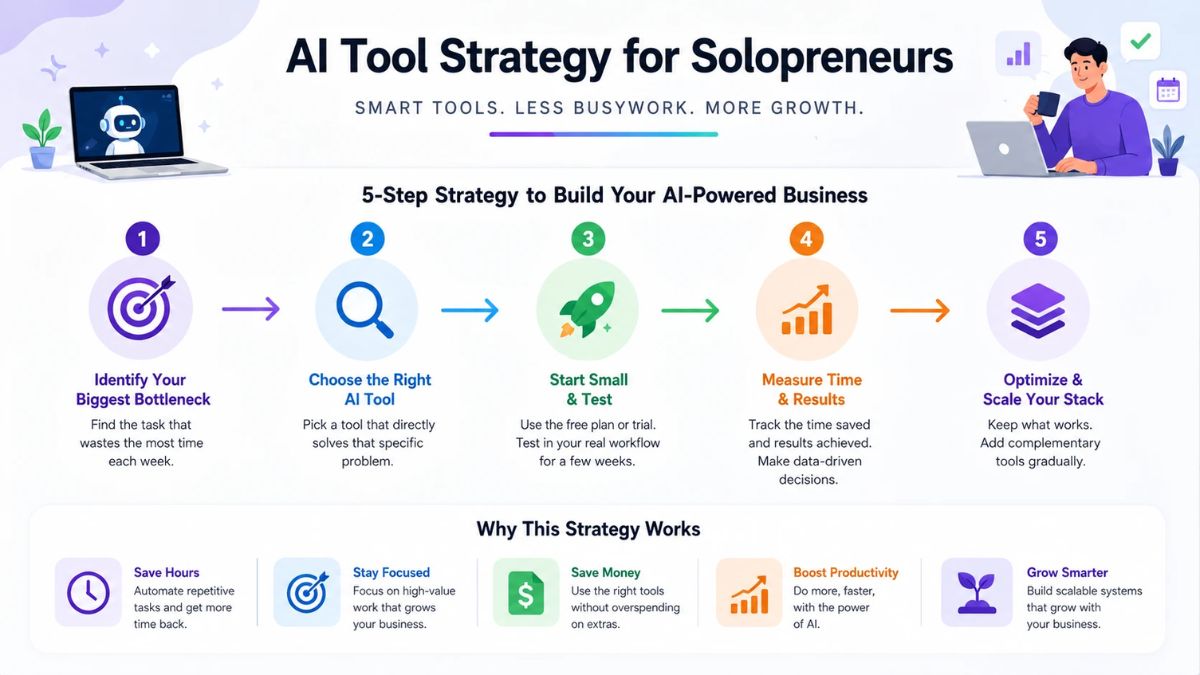
How to Choose Any Tool (A 7-Question Test)
Before you subscribe, ask:
- What exact problem does this solve? Write it in one sentence.
- How much time or money will it save me per month? Estimate honestly.
- Can my current tools already do this? Often they can.
- How hard is it to learn? Can I get value in a week?
- What data will it access? Is that acceptable?
- Can I export my data and cancel easily? Avoid lock-in.
- Is there a free tier or trial? Test with a real task before paying.
If you can’t answer questions 1 and 2 clearly, skip it for now.

Build Your Stack in Three Stages
Stage 1: Starter (Almost free)
- One AI assistant (start with a free plan)
- Cloud storage and a document tool
- A free scheduling link and invoicing option
- A spreadsheet as your customer tracker
- A basic website or link page and an email signup
Stage 2: Growing
- A paid AI plan if you hit limits and it saves you billable hours
- A proper invoicing and bookkeeping tool
- An email platform with automations
- A design tool if you create visuals weekly
- A simple automation tool for one or two workflows
Stage 3: Scaling
- Lightweight CRM and project management
- A shared set of saved prompts, skills, and templates
- Integrations between your AI assistant and your core tools
- Optional agents for background work, with strict approval rules
- A contractor or assistant who uses your system
How to Keep Your Tool Costs Low
- Start free. Upgrade only after you’ve hit a real limit.
- Pay annually only for tools you’ve used for months.
- Run a monthly subscription audit. List every tool, what it cost, and what it produced.
- Use what you already have. Check your current tools for features before buying new ones.
- Consolidate. One tool that does a decent job often beats three that do a perfect job in isolation.
- Set a monthly software budget as a percentage of revenue.
A Simple Monthly Tool Audit
On the first of each month:
- List every tool and its cost
- Mark each as Essential, Useful, or Unused
- Cancel anything Unused
- Ask whether any two tools overlap
- Review connected apps and permissions
- Note one workflow to improve next month

Using AI Safely Across Your Stack
- Give each tool the minimum access it needs.
- Keep sensitive data out of tools you haven’t vetted: financial details, health information, client secrets.
- Use strong, unique passwords and two-factor authentication.
- Require approval before AI sends, pays, signs, or deletes.
- Watch for hidden instructions inside emails, documents, and web pages that try to steer an AI.
- Back up important files outside any single tool.
- Read the privacy settings, especially memory features, and clean out what you don’t want stored.
Sample Lean Stacks
Freelance writer or designer: AI assistant with documents and design features, cloud storage, invoicing tool, scheduling link, email list.
Coach or consultant: AI assistant with a project holding your voice guide and offers, cloud storage, scheduling and payments, email platform, simple CRM spreadsheet.
Creator or online educator: AI assistant, design tool, video editor, email platform, website with course or product checkout, analytics.
Local service provider: AI assistant for messages and proposals, invoicing, calendar and booking, business listing, review requests.
Mistakes to Avoid
- Buying tools before defining the process. A tool can’t fix an unclear workflow.
- Switching tools constantly. Give each one at least a month before judging it.
- Ignoring data ownership. Make sure you can export your information.
- Treating AI output as final. Always review.
- Building a stack for a business you don’t have yet. Start where you are.
Get a Clear Plan for Your AI Stack
If you’d like a step-by-step guide to choosing tools, building workflows, and running an AI-powered one-person business with confidence, take a look at my ebook:

Trust me, a lean stack with a clear plan beats a pile of shiny tools every time.
Final Thoughts
Your tools should make your business simpler, not busier. Start with a single AI assistant, a home for your files, a way to get paid, a way to book clients, a simple tracker, and a channel you own. Add other tools only when a real problem demands them, audit monthly, and keep humans (you) in charge of the decisions. A lean stack is easier to learn, cheaper to run, and much more likely to actually get used.










Leave a Reply