


I have a confession: I used to think of AI assistants as very smart search boxes. You type, they answer, you copy and paste. Then personal AI agents arrived, and suddenly the question changed from “What can I ask it?” to “What can I hand it?”
Right now, several big AI companies are racing to build an assistant that works in the background for you: reading your messages, preparing drafts, watching your calendar, and asking for a yes or no before it acts. Anthropic has Claude Duet, OpenAI has an agent called Dots, Meta has Muse, and xAI has Grok Bot. If you run a one-person business, that’s potentially like gaining a tireless assistant who never asks for a raise.
In this guide, I’ll compare these personal AI agents for solopreneurs, explain what they have in common, where they differ, and how to choose and test one safely. Everything here is based on early launch information, and these products change quickly, so verify details on each company’s official pages.
What Is a Personal AI Agent?
A personal AI agent goes beyond a chat window. In general, it:
- Remembers your preferences and ongoing work
- Connects to apps like email, calendar, chat, accounting, and cloud storage
- Works in the background, often on its own cloud computer, even when your phone or laptop is off
- Prepares tasks such as drafts, summaries, reminders, and research
- Asks for approval before taking important actions
For a solopreneur, the appeal is obvious: less inbox triage, fewer dropped follow-ups, and a head start on admin work.
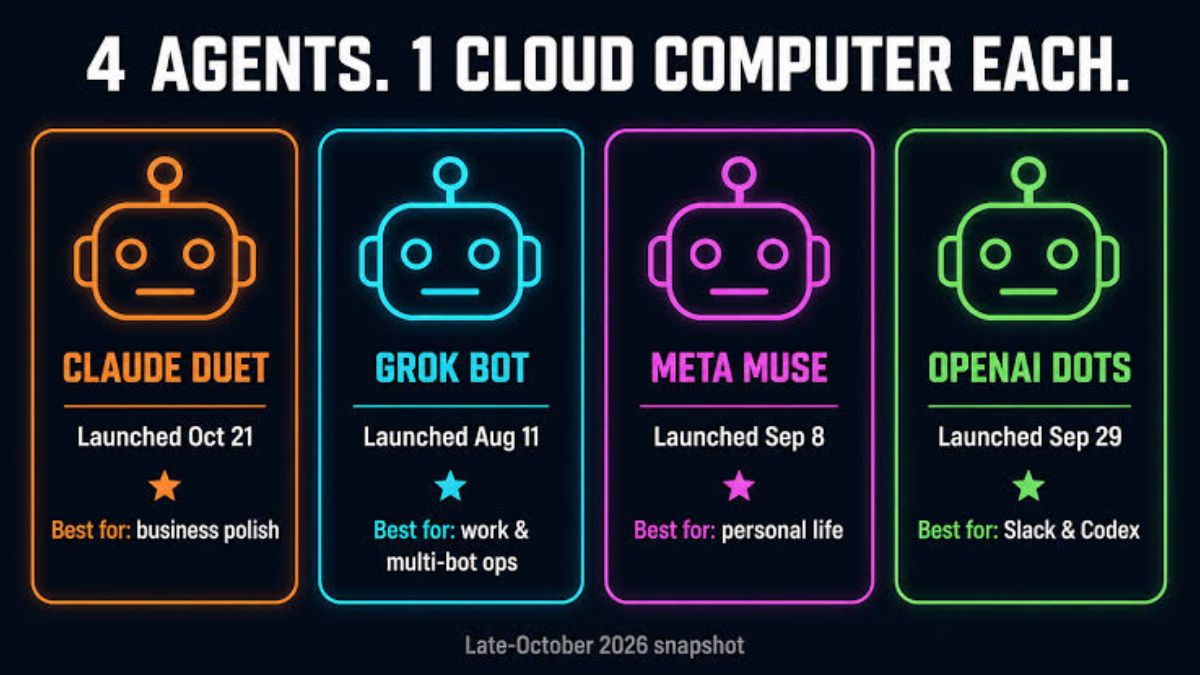
Meet the Four Agents (Early Snapshot)
Claude Duet
Claude Duet is Anthropic’s proactive agent for small businesses and professionals, currently a research preview.
- It works as one ongoing conversation by voice or text.
- It carries over your Claude memory, skills, and connected apps.
- It runs on its own cloud computer and is built around Claude Opus 5.5.
- Anthropic says it must ask for approval before sending a message, making a payment, signing, or deleting, and that some actions, like trading securities or moving money between accounts, are off-limits.
- It opened with a waitlist for Claude Pro and Max subscribers in the U.S., and it uses the same usage limits as the rest of Claude.
- Anthropic is candid that it may misread a thread or miscalibrate what’s urgent, and it checks accounts every few hours rather than constantly.
ChatGPT Dots
OpenAI’s Dots is positioned as an agent that takes on ongoing responsibilities. Based on early coverage, it builds on ChatGPT’s memory and connected tools, runs on a cloud computer, and can hand coding work off to OpenAI’s coding agent. Early reports noted regional limits at launch, including exclusions in parts of Europe, so availability depends on where you live and which plan you have.
Meta Muse
Meta’s Muse is a personal agent that can use its own secure virtual machine. Reports say you can interact through a dedicated app or through WhatsApp, which is convenient if your clients already message you there. For businesses, Meta has described uses like analyzing ad performance, building campaigns through conversation, and automating tasks with connected tools such as Shopify, QuickBooks, Canva, and Slack. Coverage says it’s free for most uses, with premium tiers in the range of $20 to $100 a month. Meta has also partnered with Shopify for agentic checkout, while Amazon reportedly asked to be removed from Muse’s agent list.
Grok Bot
xAI’s Grok Bot takes a slightly different approach, letting you create multiple named “Bots” that can work in parallel on separate responsibilities while sharing one cloud computer. That could appeal to people who like organizing agents by role, such as a “Finance Bot” and a “Content Bot.”
What They Have in Common
Despite the branding differences, early launches share a few patterns:
- Background work on a cloud computer
- Memory of your preferences
- Connected apps for email, chat, calendars, and business tools
- A proactive rhythm, such as morning briefs and check-ins
- Approval gates for risky actions
- Early-stage limitations and staged rollouts by region and plan

How to Compare Them for Your Business
Rather than chasing the “best” one, compare these factors:
1. Access and location
Can you actually use it where you live and on your plan? Several launches began with waitlists or limited regions.
2. Which tools it connects to
Make a list of the apps you use daily: email, calendar, invoicing, project management, social platforms, e-commerce. Check which agent supports them well.
3. Where you already work
If you live in WhatsApp, Muse’s setup might feel natural. If your notes, documents, and prompts already live in Claude or ChatGPT, that ecosystem may be easier.
4. Safety and control
Look for clear approval requirements, easy ways to disconnect apps, restrictions around passwords and sensitive data, and transparent explanations of what the agent did.
5. Cost and usage limits
Some agents share limits with the rest of the product, so background work can use up your allowance. Check how pricing works before relying on one.
6. Quality of judgment
A good agent doesn’t just do things. It knows when to ask. In your test, watch whether it flags uncertainty, gives sensible summaries, and avoids overreaching.
A Safe 7-Day Test Plan
Anyone can run this trial with any agent:
- Day 1: Connect only one or two low-risk accounts (such as a calendar). Write your rules: what it must never do without asking.
- Day 2: Ask for a morning brief. Compare it to your own view of what’s urgent.
- Days 3-4: Have it draft replies and reminders. Don’t send anything without reading it.
- Day 5: Test a small recurring task, like a weekly summary of open tasks.
- Day 6: Check what it remembered. Delete anything you don’t want stored.
- Day 7: Review time saved, mistakes, and any usage costs. Decide whether to expand, pause, or switch.
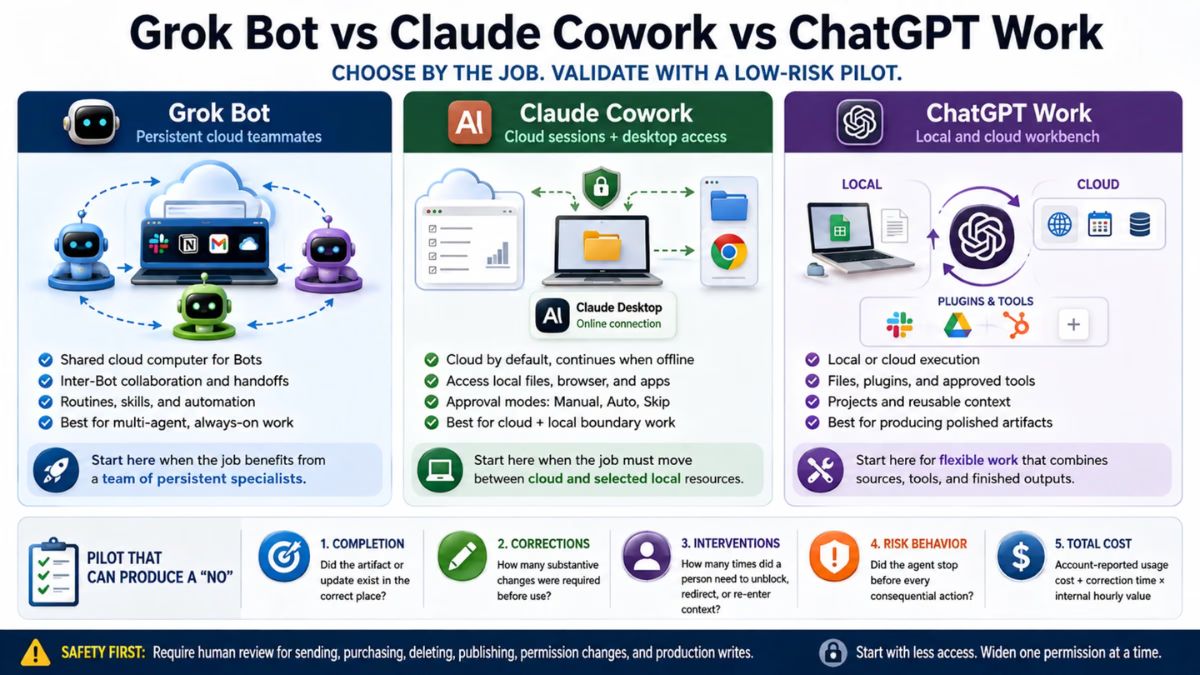
Rules for Giving an Agent Access
- Start with the smallest access that works. Add more only when it earns trust.
- Require approval for sending, paying, signing, and deleting.
- Keep sensitive data out unless you’ve reviewed the privacy settings. That includes financial details, health information, and client secrets.
- Beware of hidden instructions. Emails, web pages, and documents can contain text trying to steer an AI. Don’t let an agent act on outside content without review.
- Keep backups of important files and records.
- Review connected apps regularly and remove what you don’t use.
- Stay the decision-maker. You’re responsible for what goes out in your name.

What to Do If You Don’t Have Access Yet
You can still prepare:
- Clean up your inbox and label priority clients.
- Write down your routines: follow-ups, invoicing, content, reporting.
- Create a short document describing your voice, offers, and boundaries.
- Practice draft-and-approve loops with the regular chat assistant you already use.
- Join waitlists for the products that fit your tools and location.
The habits you build now will make any agent more useful later.
Don’t Chase the Agent. Build the System.
Agents amplify whatever system you already have. If your offers are unclear and your routines are messy, an agent will simply move the mess faster. If you’d like a step-by-step roadmap for building a solid, AI-powered solo business first, take a look at my ebook:

Trust me, it’s easier to choose the right tool when you know exactly what you want it to do.
Final Thoughts
Personal AI agents are one of the most exciting developments for one-person businesses, and also one of the easiest to over-trust. Compare access, connections, safety, and cost. Start small, keep approvals on, and judge each agent by how well it saves you time without creating risk. The best assistant is the one you can actually trust with the work you’re ready to hand off.









Leave a Reply