


Raise your hand if you’ve ever left a meeting thinking, “That could have been an email.”
Meetings are meant to move work forward, but too often they do the opposite. They run long, wander off-topic, and end without a clear plan. A week later, nobody remembers what was decided, and the same discussion starts all over again.
Whether you run a team, work with clients, or manage a small business solo, mastering meetings can give you back hours every week. In this guide, I’ll show you how to plan, run, and follow up on meetings, and how to take meeting minutes that actually keep everyone accountable.
What Are Meeting Minutes (and Why Do They Matter)?
Meeting minutes are a written record of what happened in a meeting: who attended, what was discussed, what was decided, and what needs to happen next.
They matter because they:
- Create accountability. When tasks are written down with names and deadlines, things get done.
- Prevent misunderstandings. Everyone has the same reference point.
- Save time. You don’t have to rehash old conversations.
- Provide a record. Useful for clients, partners, and your own reference.
- Show professionalism. Organized notes build trust.
Think of minutes as the bridge between talking and doing.

Before the Meeting: Set It Up for Success
Productive meetings begin long before anyone joins the call.
1. Ask: Is this meeting necessary?
Before you schedule anything, consider whether an email, a shared document, or a quick message could do the job. Meetings are best for brainstorming, solving complex problems, making decisions that need input, or building relationships.
2. Define the purpose
Write one sentence that describes what the meeting should accomplish. “Decide which two products to launch in Q3” is clear. “Catch up on things” is not.

3. Create a simple agenda
An agenda keeps everyone on track. Include:
- Topics to cover
- Time allotted for each topic
- Who leads each item
- Desired outcome (decision, update, brainstorm)
Send it at least a day in advance so participants can prepare.
4. Invite the right people
Keep the guest list lean. If someone doesn’t need to contribute or make decisions, send them the minutes afterward instead.
5. Choose a smart time and length
Shorter is better. Try 25 minutes instead of 30, or 50 instead of 60, to give everyone a buffer. Avoid scheduling meetings during people’s peak focus hours when possible.
During the Meeting: Keep It Focused
Start on time
Starting late teaches people that punctuality doesn’t matter. Begin on the dot, even if someone is missing.
Restate the purpose
Open by sharing the goal and agenda. Something like: “Today we need to decide on the Q3 launch and assign next steps. We have 30 minutes.”
Assign a note-taker
Don’t try to lead and write at the same time. Assign someone to take notes, or take them yourself if it’s a one-on-one. Use a consistent format so everything is easy to find later. The Business Meeting Minutes template gives you a ready-made structure for attendees, agenda items, decisions, and action items, so you never have to start with a blank page.

Stick to the agenda
If a side topic comes up, put it in a “parking lot” list to address later. Politely steer back: “Great point. Let’s add that to the parking lot and revisit it after we finish the agenda.”
Encourage participation
Invite quieter voices. Ask direct questions: “Sarah, what’s your take on the timeline?” The best ideas don’t always come from the loudest people.
End with action items
Never end a meeting without answering three questions:
- What needs to be done?
- Who is responsible?
- By when?
Read these aloud to confirm everyone agrees.
How to Take Great Meeting Minutes
Good minutes are clear, concise, and useful. You don’t need to record every word. Focus on the essentials.
What to include
- Meeting title, date, and time
- Attendees and absentees
- Purpose or agenda
- Key discussion points (brief summaries)
- Decisions made
- Action items with owners and deadlines
- Next meeting date
Simple meeting minutes template
Meeting: [Name of meeting]
Date/Time: [Date and time]
Attendees: [Names]
Absent: [Names]
Agenda Items & Discussion
- [Topic] – [Summary of discussion]
- [Topic] – [Summary of discussion]
Decisions
- [Decision 1]
- [Decision 2]
Action Items
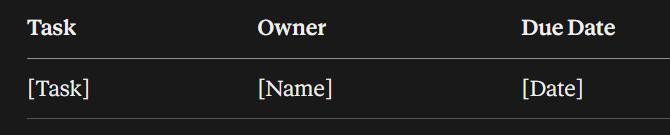
Next Meeting: [Date]
Rather than rebuilding this each time, use the ready-made Business Meeting Minutes pages so your notes stay consistent from meeting to meeting.

Tips for better notes
- Use bullet points instead of long paragraphs.
- Capture decisions precisely. Wording matters.
- Write in a neutral tone. Stick to facts.
- Highlight action items in bold or a different color.
- Note questions that need follow-up.
- Review while it’s fresh. Clean up your notes right after the meeting.
After the Meeting: Follow Up Fast
A meeting only creates value if people act on it.
Send the minutes within 24 hours
The sooner you send them, the more likely people are to act. Keep the email short: a quick thank-you, the key decisions, and the action items.
Track action items
Don’t let tasks vanish into inboxes. Add each action item to your planner or task system. The Work Day Organizer is useful for turning meeting takeaways into scheduled tasks and priorities for the day.

If you manage lots of emails and follow-ups, the Inbox Tracker (Editable in Canva) keeps you on top of replies and pending items so nothing gets missed.

Check in on progress
Before the next meeting, review the previous minutes. Start by asking for updates on action items. This reinforces accountability and keeps momentum going.
Types of Meetings and How to Run Them
One-on-one meetings
Great for coaching, feedback, and building relationships. Keep a running document of topics, wins, and challenges. Ask open-ended questions and listen more than you talk.
Team meetings
Use them for updates, alignment, and problem-solving. Keep status updates short; use the meeting time for discussion rather than reading reports out loud.
Client meetings
Prepare a clear agenda, confirm expectations, and send a recap with next steps. This builds trust and prevents scope confusion. Having organized notes also protects both sides if details are questioned later.
Planning or goal-setting meetings
Review progress toward goals, decide priorities, and plan the next period. Pair these with a tool like the Top 3 Main Goals Right Now Journal to keep everyone focused on the few things that matter most.

Brainstorming sessions
Set a timer, welcome all ideas, and hold off on judging. Capture everything, then narrow down to the best options afterward.
Common Meeting Mistakes (and How to Avoid Them)
No agenda. Fix: Always send one, even if it’s three bullet points.
Too many attendees. Fix: Invite only essential people.
Running over time. Fix: Use a visible timer and assign time limits per topic.
No clear outcome. Fix: Define the decision or deliverable upfront.
Vague action items. Fix: Always include owner and deadline.
Skipping minutes. Fix: Use a consistent template and assign a note-taker.
Talking more than listening. Fix: Pause and invite input.
Meeting Tips for Solo Business Owners
Even if you work alone, “meetings” are valuable. Schedule a weekly meeting with yourself to review your numbers, plan priorities, and decide what to work on next.
- Weekly check-in (30 minutes): Review last week, plan this week.
- Monthly review (60 minutes): Look at sales, expenses, and goals with a tool such as the Monthly Business Tracker.
- Quarterly planning (2 hours): Set bigger goals and decide on new initiatives.
Take minutes on these sessions too. Looking back at your own notes helps you see how far you’ve come and spot trends in your business.

Virtual Meeting Tips
- Test your tech beforehand.
- Mute when not speaking.
- Share your screen only when necessary.
- Record (with permission) for people who can’t attend.
- Use chat for questions and links.
- Take short breaks if the meeting runs longer than 45 minutes.
Meeting Checklist
Before:
[ ] Decide if a meeting is truly needed
[ ] Define the goal
[ ] Send the agenda
[ ] Invite only essential people
During:
[ ] Start on time
[ ] Assign a note-taker
[ ] Follow the agenda
[ ] Confirm action items
After:
[ ] Send minutes within 24 hours
[ ] Add tasks to your planner
[ ] Follow up on progress
Final Thoughts
Great meetings don’t happen by accident. They come from clear goals, simple agendas, focused discussion, and strong follow-up. And great minutes turn conversations into action.
Start with your next meeting: write a short agenda, assign a note-taker, and end with clear action items. Within a few weeks, you’ll notice shorter meetings, fewer misunderstandings, and more work actually getting done.
Ready to make your meetings count? Grab the Business Meeting Minutes template, then use the Work Day Organizer to schedule every action item.









Leave a Reply