

If the idea of posting on Instagram every single day leaves you drained or distracted from actual business work, good. You’re in the right place. Consistency isn’t about daily output — it’s about predictable quality and recognizability. You can show up reliably for your audience, grow your brand, and keep sane with a system that runs on smart formats, small routines, and a planner that keeps it all visible.
Below I’ll walk you through how to set up a consistent Instagram content system that respects your energy, scales with your business, and helps you keep a beautiful, branded feed — without the pressure to post every day. I’ll also show exactly how to use the My Brand Identity for Instagram Planner to make the system stick.
Why “consistent” doesn’t mean “daily”
- Consistency = dependable value and visual identity. If followers know what you stand for and what your posts look like, they’ll keep coming back.
- Daily posting is a tactic, not a requirement. Many creators succeed on 3–5 posts a week, or even less with the right strategy.
- The goal: a predictable rhythm that aligns with your capacity and business goals (lead generation, product sales, community building).
Core principles of a sustainable system
- Reusable content formats: Create modular templates you reuse. Think of content like building blocks: a How-To, a Behind-the-Scenes, a Testimonial, a Carousel Tip, a Quote, a Product Showcase. Each format has a clear outcome (teach, persuade, humanize, convert).
- Visual consistency rules: A limited color palette, consistent typography, and repeatable image types make your feed feel cohesive even if you post 3 times a week.
- Cadence driven by capacity: Pick a realistic publishing cadence and stick to it. Better: pick a production cadence (e.g., batch twice monthly) and a publishing cadence (e.g., Tue/Thu/Sat) that you can maintain.
- Lightweight batching: You don’t need to shoot everything in one marathon. Two focused batch sessions per month plus weekly micro-sessions is a sustainable pattern.
- Repurposing system: Always plan how a single asset can be used across post types and platforms.
Step 1 — Define your content ecosystem (so each post has a job)
Start by listing the outcomes you want from Instagram. Common jobs:
- Educate potential customers (teaching)
- Build know/like/trust (personal, brand stories)
- Convert (promos, product features, case studies)
- Community engagement (questions, polls, UGC)
- Evergreen presence (quotes, saved-value content)
Map each job to 3–5 content formats. Example:
- Educate: carousel tutorial, quick tip Reel, short caption how-to
- Trust: founder story photo, daily routine Reel, candid caption
- Convert: product close-up, before/after carousel, testimonial post
- Community: question post with CTA, poll in Stories, share follower posts
- Evergreen: quote graphic, checklist carousel, top-resources post
Why formats matter: once you define formats, you draft copy and visuals faster. You’ll also be able to re-use templates — both visual and structural.
Step 2 — Create visual and caption templates
Visual templates (what to standardize)
- Feed grid rule: Decide if you want a checkerboard pattern, row-based look, or free-flow. Keep it simple.
- Color palette: Choose 3 primary colors + 1 neutral. Apply them consistently across templates.
- Typography: Pick 1–2 fonts. Headline + body font usage should be fixed.
- Photo treatment: Decide one photo style — close-up portraits, lifestyle, flat-lay — and an editing preset for cohesion.
Caption templates (structure that repeats)
- Hook — 1-2 line opener that grabs attention
- Value — 1-3 short paragraphs with practical tips or story
- CTA — question, save/share, or link in bio direction
Create 4–6 caption skeletons that match your formats. This speeds drafting and makes posts predictable in purpose.

Step 3 — Build a realistic posting cadence from your capacity
Ask yourself:
- How many hours per week can I dedicate to content creation?
- Do I prefer batching or weekly micro-creation?
- Are there seasonal events or launches that require more volume?
Example sustainable cadences:
- Minimal: 2 posts/week (educate + trust), Stories daily-ish
- Moderate: 3 posts/week (educate, convert, community), 3–5 Stories/week
- Growth push: 4–5 posts/week for a month around a launch, then return to moderate
Important: separate production cadence from publication cadence. You can batch production once a month for a 3-post/week schedule and be done for weeks.
Step 4 — Batching that doesn’t burn you out
Two effective batching models:
- Deep batch (monthly): 1–2 days per month shooting and designing visuals, writing captions, and scheduling posts.
- Micro-batch (weekly): 1–2 hours each week to record a Reel, draft captions, and gather UGC.
How to plan a monthly batch:
- Week 1: Choose themes for the month and pick your 3–5 formats per week.
- Batch Day 1: Photos + short videos (shoot 8–12 assets).
- Batch Day 2: Edit and design templates, write captions and CTAs, create Stories.
- Schedule posts using your favorite scheduler.
Micro-batch week plan (if deep batching feels heavy):
- Monday: Draft 1 carousel idea + captions
- Wednesday: Record 1 Reel (15–60 sec)
- Friday: Design and schedule 1 photo post
Step 5 — Repurpose like a queen
From one batch session you should aim for multiple outputs:
- Reel recorded as a talking-head? Clip it into 1–2 Reels, a short Story, and a captioned still image.
- Carousel can become a 30–60 sec Reel (voice-over), and each slide can be an individual post or Story.
- Long caption can be split into a carousel and a micro-blog post.
Repurposing cuts production time and multiplies reach.

Step 6 — The content calendar that connects formats to goals
Your calendar should be simple and outcome-driven:
Columns: Date — Post Type — Format — Topic/Headline — Visual template — CTA — Status (Idea/Design/Scheduled/Posted)
Color-code by job (teach/convert/trust/community/evergreen) so you always have balance.
A weekly rhythm example (3 posts/week):
- Tuesday (Educate): Carousel tutorial (teach)
- Thursday (Trust): Founder story photo + long caption (trust)
- Saturday (Convert or evergreen): Product feature or checklist carousel (convert/evergreen)
This rhythm helps followers know what to expect. It also makes batching predictable: when you batch, you create 4 Tuesdays, 4 Thursdays, and 4 Saturdays of content at once.
Step 7 — Metrics that matter (and what to ignore)
Track metrics aligned with goals:
- Awareness: Reach and impressions
- Engagement: Saves and comments (not vanity likes)
- Community: DMs and Story replies
- Conversion: Link clicks, bio link conversions, sales tied to posts
Don’t obsess over daily follower numbers. Focus on week-over-week trends and content-level performance.

Using the My Brand Identity for Instagram Planner to make this system practical
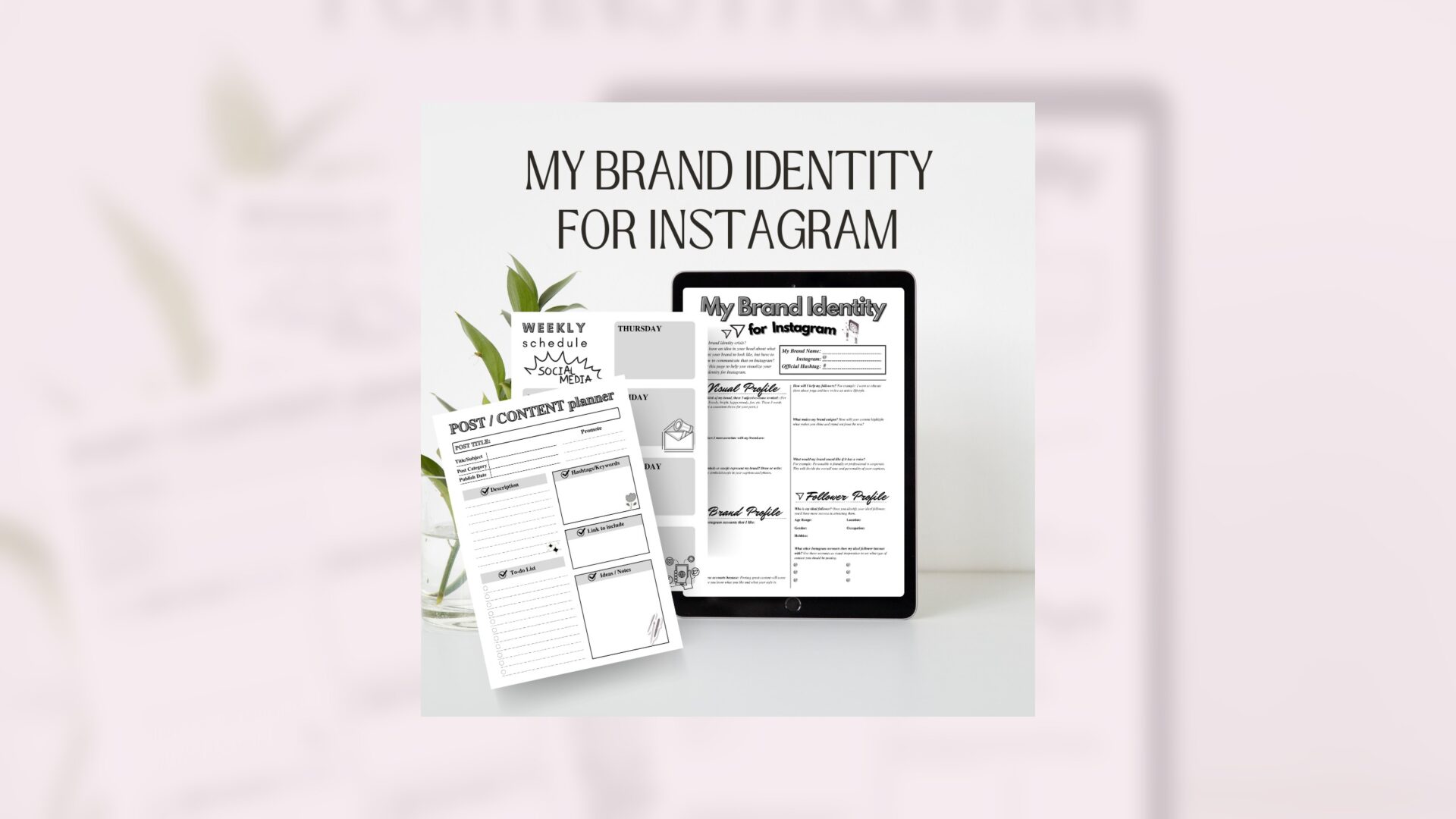
If you want to take the messy notes in your head and turn them into a repeatable system, a visual planner that lives inside Canva is a fast, affordable tool. The My Brand Identity for Instagram Planner is an editable Canva template designed for brand colors, captions, typography, and content calendars. Here’s how to use it in this system:
- Visual rules: Use the planner to lock in your feed colors, typography selections, and image placement. When you open Canva, you’ll have templates ready to drop images into and keep your feed cohesive.
- Content calendar: The planner includes a content calendar layout so you can map your monthly themes, assign formats to each date, and color-code by content job.
- Reusable templates: Populate the planner with your chosen formats — the carousel layout, quote card, product feature grid — then duplicate them each batch session.
- Captions and hashtag bank: Keep caption skeletons and a tested hashtag bank inside the planner so you don’t rewrite the same content every time.
- Visual placeholders: Plan your feed aesthetics by mocking up how a month will look, moving assets around until you’re happy with the visual rhythm.

Buy the My Brand Identity for Instagram Planner here: My Brand Identity for Instagram Planner / Editable Canva Template
My Brand Identity for Instagram Planner / Editable Canva Template
Practical example — A month in the life of a 3-post/week system
Meet Lara, a coach who wants to promote her signature program but can’t post daily. She chooses a 3-post/week cadence and three reusable formats: Mini-Tutorial Carousel, Client Spotlight Photo + Caption, and Product Roadmap Carousel.
Month planning:
- Theme: “Get clarity on your offer”
- Week 1: Mini-Tutorial (positioning tips), Client Spotlight (testimonial), Product Roadmap (how the program solves pain)
- Week 2: Mini-Tutorial (pricing exercise), Client Spotlight (before/after results), Product Roadmap (module sneak peek)
- Repeat similar structure each week with different subtopics.
Batch plan (two half-days):
- Day 1: Photoshoot for 4 client-spotlight images and 6 lifestyle/product shots. Record 4 short talking-head clips for Reels.
- Day 2: Design 8 carousel templates and fill in copy from caption skeletons. Schedule posts.
Outcome: Lara posts 3x per week, her feed remains visually cohesive, and she still has time for client work. Because she used reusable formats and a planner template, each batch only took a few focused hours.
Handling Stories and Reels without the daily grind
Stories and Reels are where personality and reach live. You can do them without daily burnout:
- Stories: Adopt a “daily-ish” habit where you post 3–6 Stories a week: a behind-the-scenes, a tip, a poll, a product reminder. Schedule a weekly Story brainstorm and reuse assets.
- Reels: Create 2–4 Reels per month from your batch footage. Repurpose carousel content into short clips and vice versa. Use hooks and captions from your caption templates.
The safety net: evergreen and pillar content
Always have 6–12 evergreen pieces in your planner. Evergreen content — checklists, how-tos, core beliefs — can be reshared months later. Pillar content are the pieces that explain your signature offer and can be re-used in sales cycles.
Troubleshooting common obstacles
- “I have no time for big batches.” Try micro-batching: 1 hour/week focusing only on one format. Over a month you’ll build content.
- “My feed looks boring.” Rotate color accents and photo styles within your templates. Use a monthly theme to bring freshness.
- “I run out of caption ideas.” Use caption skeletons and an ideas bank in your planner. Interview clients and put their quotes into posts.
- “I forget to post.” Use scheduling tools and mark your planner clearly; set two reminders on batch day and posting day.
A simple 30-minute weekly routine to maintain momentum
- 5 min: Check comments/DMs and reply
- 10 min: Review calendar and move any assets from Idea to Design
- 10 min: Create or edit one short asset (a Story, Reel clip, or image)
- 5 min: Schedule or confirm scheduled posts
This routine keeps your system humming without commandeering the week.
When to scale up
If you have launches or promotions, scale your publishing for those weeks (4–6 posts/week) and return to your sustainable cadence afterward. Use the planner to duplicate your weekly structure for the ramp-up so nothing is created from scratch.
Final checklist — build your consistent Instagram content system
- Decide your job mix (teach/trust/convert/community/evergreen)
- Choose 4–6 reusable content formats
- Lock in color palette and typography
- Set a realistic posting cadence and a matching production cadence
- Batch content with templates and reuse assets
- Repurpose every asset into 2–3 outputs
- Use a content calendar and track the right metrics
- Keep a 30-minute weekly maintenance routine
Create your kit: an organized planner makes everything easier
If you want the fastest path from idea to predictable content, use an editable planner that holds your brand identity templates, captions, and calendar in one place. The My Brand Identity for Instagram Planner is an editable Canva template that includes content calendars, feed colors, typography choices, image placement, and caption layouts — everything you need to build and maintain a consistent Instagram content system without posting every day.

Grab it here: My Brand Identity for Instagram Planner / Editable Canva Template
My Brand Identity for Instagram Planner / Editable Canva Template










Leave a Reply