


There’s a special kind of frustration that every Claude user knows. You’re in the middle of something important, the ideas are flowing, and then… a message appears telling you you’ve hit your limit. I once hit mine halfway through writing a client proposal. Not fun.
The truth is, most of us hit limits because of how we use Claude, not just which plan we’re on. And with the newest Claude updates, choosing a plan and managing usage has become more interesting. Docs, Slides, and Design are now on every plan including Free, Pro and Max subscribers get early access to agent features, and the new models are designed to be more efficient.
In this guide, I’ll explain how to choose between Claude Free, Pro, Max, and Team, which new features come with which plan, and practical ways to make your usage last longer. I’m not going to quote prices here, because they change. Always check the official pricing page for current numbers.
The Plans at a Glance (In Plain English)
Here’s how I think about the options:
- Free: A great way to learn Claude and handle light, occasional tasks. Recent updates mean Free users now get Claude Docs, Slides, and Design.
- Pro: For regular users who rely on Claude every week for writing, planning, research, and creating documents. Pro users get early access to many new features.
- Max: For heavy users who want much more room to work, such as people who run long sessions, use Claude Code often, or rely on agents throughout the day.
- Team and Enterprise: For organizations that need collaboration, admin controls, security features, and shared workspaces.
Exact usage allowances, features, and prices differ by plan and can change, so use the official help center and pricing pages as your source of truth.

Which New Features Come With Which Plan?
Based on Anthropic’s recent announcements:
- Claude Docs, Slides and Design: Available on every plan, including Free.
- Claude Dashboards (beta): Available on paid plans.
- Claude Motion (beta): Available on Team and Enterprise.
- Cowork and chat merging into one Claude: Rolling out in stages, beginning with Pro and Max on web, desktop, and mobile.
- Claude Duet (research preview): A waitlist for U.S. Pro and Max subscribers. It uses the same usage limits as the rest of Claude.
- Claude in Google Docs, Sheets and Slides (beta): Available on paid plans.
- Redesigned Claude Code Projects (staged beta): Rolling out to selected Pro and Max Claude Code subscribers.
- Enterprise controls: Admins can turn certain features on or off for their organizations.
Because betas and previews roll out gradually, you may not see every feature right away even if your plan technically includes it.

Usage Limit News Worth Knowing
Anthropic has made a few changes that affect how far your plan goes:
- Higher five-hour limits. When Claude Opus 5.5 launched, Anthropic said it was increasing five-hour usage limits on Pro, Max, Team, and seat-based Enterprise plans.
- A saved rate limit reset. Anthropic also gave subscription users a rate limit reset that you can save and use whenever you choose.
- A “wrap-up” allowance in Claude Code. If a five-hour limit interrupts a response that’s already in progress, Claude Code may get a small capped allowance to reach a stopping point. It can’t start a new message, it counts toward the weekly limit, and it’s rolling out gradually. Don’t treat it as extra capacity.
- More efficient models. Anthropic says Opus 5.5 costs about 40% less to run than the previous Opus on typical workloads, and Sonnet 5.5 can cost up to 30% less per task than the previous Sonnet. Those savings refer to token usage on typical workloads. They’re not a blanket discount on subscriptions.

10 Ways to Make Your Claude Usage Last Longer
1. Use the right model for the job
Start with Sonnet 5.5 for everyday work and save Opus 5.5 for complex tasks. A quick caption doesn’t need your biggest model.
2. Keep effort at a sensible level
In the Claude apps, the default effort is Medium. Higher effort reasons longer and uses more. Only raise it when the answer isn’t good enough.
3. Start new chats for new topics
Very long conversations carry a lot of history that Claude has to process each time. When you switch topics, start fresh and paste in only what’s needed.
4. Use Projects for recurring context
Instead of re-explaining your business in every chat, save background information in a Project so you can start quickly.
5. Write clear, complete prompts
A precise prompt often avoids five rounds of back-and-forth. Include your goal, audience, format, and examples up front.
6. Ask for what you need, not everything
“Give me three headline options” uses less than “Write 30 headlines.” Request more only if you need it.
7. Be careful with large uploads
Big files and long documents consume more of your allowance. Share only the sections that matter.
8. Batch similar tasks
Group related requests in one message, like “Write five captions for this launch,” rather than sending five separate requests.
9. Watch your agents
Background work, scheduled tasks, and agent features like Duet draw from the same usage limits. Start with one narrow routine, then add more only if the value is clear.
10. Track what’s worth it
For one week, note which Claude tasks saved you real time or made you money. Spend your allowance there.

How to Choose a Plan: A Simple Decision Guide
Ask yourself these questions:
- How often do I use Claude? A few times a month points to Free. Several times a week points to Pro. Hours every day points to Max.
- What do I use it for? Quick questions and light writing fit Free. Reports, research, content batches, and recurring workflows fit Pro. Long sessions, coding, and agents fit Max.
- Do I need agent features? If you want early access to Cowork and Duet-style tools, a paid plan is the path.
- Do I work with a team? If you need shared workspaces, admin controls, and collaboration, look at Team.
- What happens when I hit a limit? If waiting costs you client time or revenue, a higher plan might pay for itself.
Pro tip: Try the free plan or a lower tier first, track when you hit limits, and upgrade only if the limits actually slow your income-producing work.
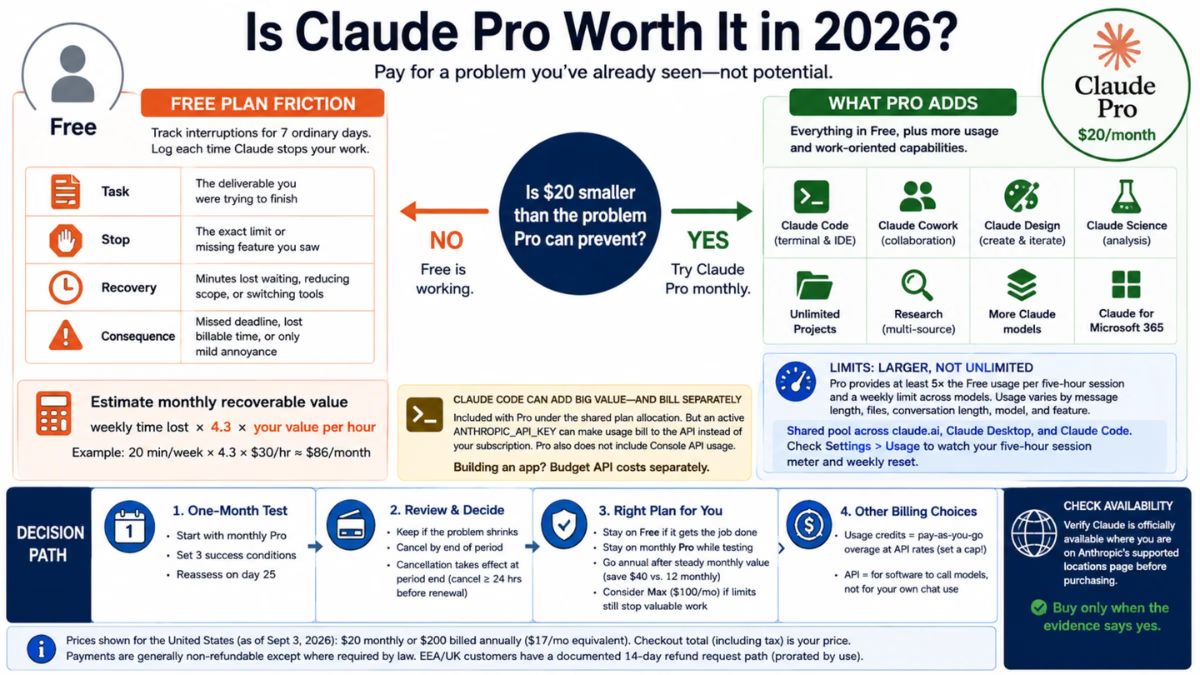
Calculating Whether a Paid Plan Is Worth It
Here’s a quick formula I use:
- Estimate how many hours per month Claude saves you.
- Multiply by what an hour of your time is worth (or would cost to outsource).
- Compare that number to the monthly cost.
If Claude saves you a few hours a month on tasks that would otherwise be paid or delayed, a plan often pays for itself. If you rarely use it, stay on the free tier.
What About the API?
If you’re building tools or automations, the API is priced per token rather than as a subscription. Anthropic’s published rates for Claude Opus 5.5 are $4 per million input tokens and $20 per million output tokens, and for Claude Sonnet 5.5 they are $2 and $10. Cache reads and other options can change the total cost. Check the official pricing page for the current numbers and for Haiku 5.5.
Get More Value From Every Plan
Whichever plan you choose, results come from using Claude on the right tasks with the right instructions. If you’d like a practical playbook for building repeatable Claude workflows that save time and help you earn more, check out my guide:

Trust me, getting better at using Claude is the cheapest upgrade you can make.
Final Thoughts
The best plan isn’t the most expensive one. It’s the one that matches how you actually work. Use Free to learn, move to Pro when Claude becomes part of your weekly routine, consider Max when limits slow you down, and pick Team when you need to collaborate. And remember that smart habits, like choosing the right model, using Projects, and writing clear prompts, can stretch any plan further.










Leave a Reply