

Summer is a different animal. Meetings get shuffled around because someone’s at a conference, your energy dips in the afternoon heat, and social invites pile up faster than your inbox. If your default is to try to “power through” what’s normal in autumn, you’ll burn out or drop important tasks. The smarter move is to reset your workday for the season — not a one-time overhaul, but a set of practical shifts you can rely on until things calm down.
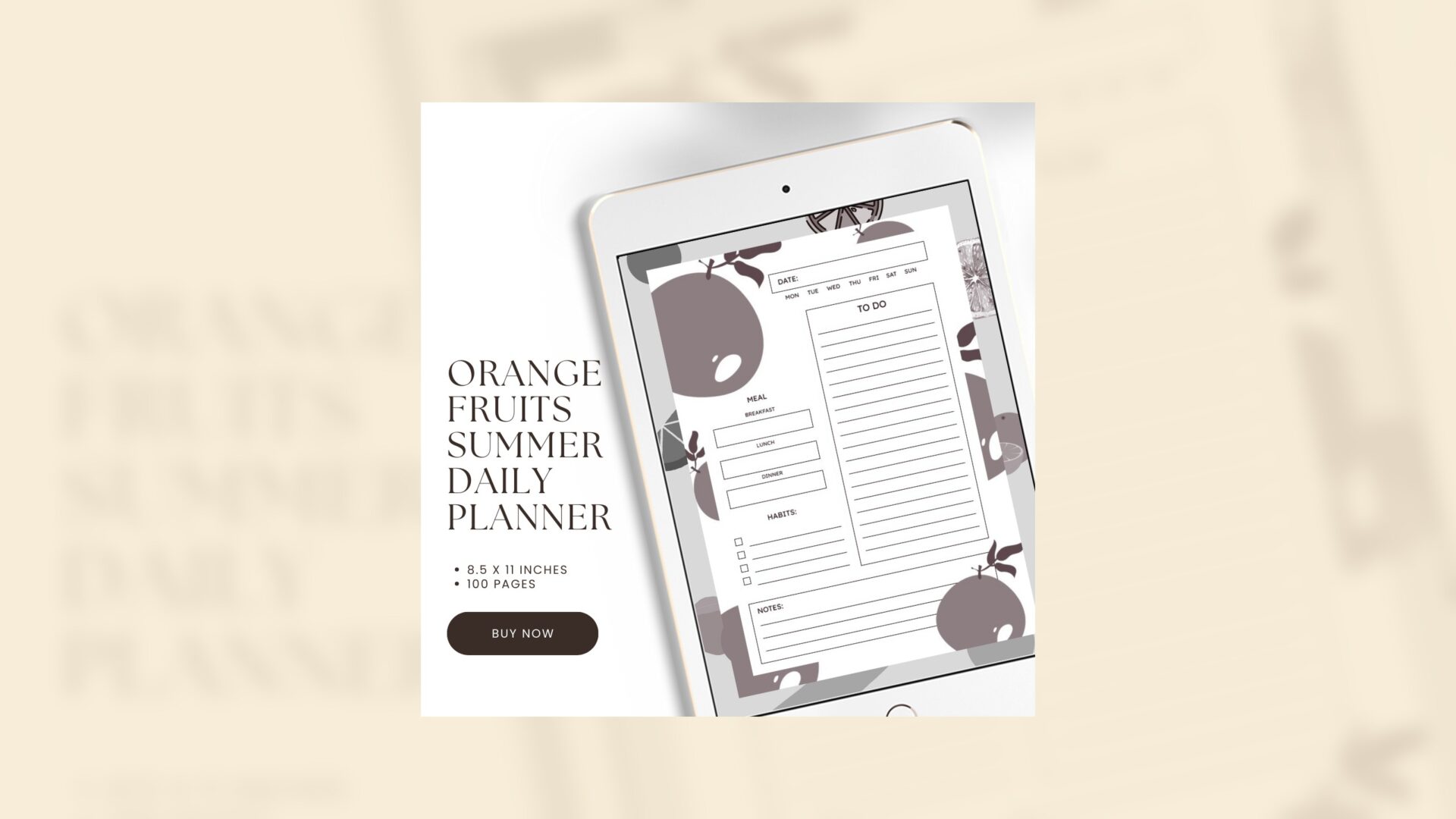
In this article I’ll walk you through a summer productivity routine that respects seasonal capacity and keeps your work momentum: how to plan around heat and travel, protect deep work blocks, handle social and vacation overlap, simplify meals, and use flexible daily plans and notes so nothing falls through the cracks. I’ll also show how a summer-friendly planner (I recommend the Orange Fruits Summer Daily Planner) can make this less mental load and more “open-and-do.”
Note: If you want a printable editable planner designed for summer-friendly to-dos, meals, and notes, check out the Orange Fruits Summer Daily Planner. This editable Canva template is digital and printable and built for summer routines: https://omnimart24h.com/product/orange-fruits-summer-daily-planner/. Commercial link disclosure: That’s an affiliate product link — I only share tools I find genuinely useful for seasonal planning.
Orange Fruits Summer Daily Planner / Editable Canva Template
Why your regular routine stalls in summer (and what to accept)
- Heat affects energy differently: afternoons that felt fine in spring become sluggish, so your sustained-focus windows may shift earlier or later.
- Travel and events increase unpredictability: half-days, travel days, and meetings outside your usual cadence are common.
- Social pressure rises: people expect you to be flexible for weekend parties, day trips, or hosting — which is great, but it can bump work tasks.
- Food and hydration routines change: skipping meals, eating lighter, or grabbing convenience food will affect mental clarity.
Acceptance is the first step. A summer productivity routine isn’t about forcing autumn-grade output; it’s about protecting the work that matters, resizing the to-do list, and building systems to handle the messier calendar.
Inventory your seasonal capacity: realistic work planning
Before swapping tools or fighting the heat, do a quick capacity review:
- List non-negotiables for the season (product launches, payroll deadlines, legal dates).
- Mark known travel/social commitments (weekends away, weddings, summer camps, conferences).
- Rate your weekly energy windows (e.g., best hours Mon-Wed: 8–11am; slower: 2–4pm).
- Decide your available work-days/hours target (not aspirational—realistic).
Example: You normally work 40 hours a week. Summer travel and energy dips mean you’ll reliably have 32–34 high-quality hours. Accepting that number helps you plan priorities that fit the time you actually have.

Map weekly outcomes to flexible daily blocks
Instead of trying to do more each day, pick the weekly outcomes that matter and create portable, short work blocks to achieve them.
- Choose 3 top weekly outcomes (client deliverable, sales outreach, content piece).
- Break each outcome into 2–3 actions that can be completed in 60–90 minute blocks.
- Label blocks as “portable” or “fixed”: portable blocks can move for travel/socials (e.g., email triage, draft editing); fixed blocks are anchored to collaborators’ schedules (e.g., client calls).
Concrete example:
Weekly outcome: Publish a newsletter.
- Block 1 (60–90 min, Monday morning): Draft outline and subject line brainstorming.
- Block 2 (45–60 min, Tuesday afternoon, portable): Write body copy (can happen in a coworking café).
- Block 3 (30 min, Thursday morning): Final edits and scheduling (fixed).
Why this works: shorter blocks respect summer energy troughs and are easier to move around when life gets in the way.
Beat the heat with timing and environment tweaks
Summer productivity is as much about environment as it is about planning.
- Front-load deep work: Shift deep-focus tasks into your coolest, highest-energy windows (often mornings). If you’re a night person, shift your heavy work to evenings when it’s cooler.
- Use micro-environment hacks: a small fan, cold water bottle, cooling towel, or shaded workspace can add an hour or two of usable focus time.
- Move work to alternative spaces: coworking with AC, cafés, libraries, or a shaded patio can break monotony and lower distraction.
- Schedule lighter or creative tasks during the hottest part of the day (creative ideation, reviewing visuals, or responding to non-urgent messages).
Practical midday schedule:
- 7:00–10:00 — Deep work (highest-priority tasks)
- 10:00–11:00 — Meetings or calls (when partners are available)
- 11:00–1:00 — Portable admin tasks (email triage, quick edits)
- 1:00–2:30 — Lunch + walk (move away from screens)
- 2:30–4:00 — Light creative work or buffer for overflow
- 4:00–5:00 — Daily wrap, plan next day

Protect live collaboration and client relationships
Travel and summer chaos can make you look flaky if you don’t proactively manage expectations.
- Send a short “summer availability” note to clients and team members listing any known travel or blackout dates and your best contact hours.
- Use calendar blocks for “limited response” windows (e.g., Mon & Wed mornings reserved for deep work — response times will be slower).
- When traveling, confirm meeting times and timezone details in the calendar invite and add a one-line agenda. That reduces time wasted on unnecessary status calls.
Example message to clients:
“Quick FYI — I’ll be traveling on June 20–24 with limited email. I’m available in the mornings of June 18 and 19 for prep calls. If anything urgent arises while I’m away, please text me and I’ll check within X hours.”
Make travel days productive (without overcommitting)
Travel days can be surprisingly productive if you plan around energy and logistics.
- Pre-flight checklist: download files, set offline folders, note key tasks you can complete without full focus (e.g., outline a blog post, file naming, short emails).
- Pack a small “travel work kit”: charger, power bank, noise-cancelling earbuds, a compact notebook, and a simple snack.
- Use travel time for low-brain tasks that still move work forward (editing, content repurposing, email batching).
- Build a quick “landing routine” for arrival days: 30 minutes to triage messages, prioritize one meaningful task, then shift fully into travel mode.
Portable workflow example:
- Flight: complete outline + 500–700 words draft, or batch social captions.
- Post-arrival (30–45 min): scan messages, flag urgent items, schedule any quick follow-ups for the next morning.

Simplify meals to preserve mental energy
What you eat and when you eat matters more in summer when dehydration and skipped meals compound fatigue.
- Batch simple, cooling meals: salads with protein, grain bowls, or overnight oats keep decision load low.
- Hydration station: keep a visible water bottle, add electrolytes if you’re out in the heat, and set a gentle timer if you forget to drink.
- Smart snacks: almonds, yogurt, or fruit avoid sugar crashes that can wreck afternoon productivity.
Meal prep plan:
- Sunday (30–45 min): Roast a protein, wash and chop salad greens, make a grain base. Portion into three or four ready-to-eat containers.
- Midweek refresh: make a simple vinaigrette and have citrus or berries on hand for quick flavor boosts.
Habits that actually move the needle (not aspirational)
Summer is a lousy time to add big new habits. Instead, pick small habit tweaks that protect your headspace.
- Evening micro-shutdown (10 minutes): review tomorrow’s top three outcomes, set a 30-minute morning focus block, and write one win from today.
- Hydration checkpoints: four sips of water every 45 minutes is simple and measurable.
- Movement breaks: two five-minute walks outside to reset focus and cool off.
Daily shutdown example:
- 5 minutes: Tidy workspace
- 3 minutes: List the top 3 outcomes for tomorrow
- 2 minutes: Close browser tabs not needed for tomorrow
Use your notes section like a summer logbook
Summer logistics and spontaneous ideas pile up. Use the notes section of your daily planner as a running log:
- Track travel expenses, receipts, and quick notes from meetings on the road.
- Capture genius moments during poolside downtime — the idea might be useful later.
- Log recurring issues (e.g., afternoon fatigue Friday after two late nights); patterns help you adjust.
Transfer those notes weekly into longer-term planning so you don’t lose insight to summer fuzziness.

Flexible daily planning: make shifting priorities painless
Rigid planning breaks fast during summer. Instead, build flexibility into daily plans:
- Two-tier tasks: “Must-do” (3 items max) and “Optional (if time)” (2–3 items).
- Portable vs. anchored tags: mark tasks that can move with travel or social plans as “portable.” Anchor tasks that require teammates as “fixed.”
- Quick replanning window: allocate 10–15 minutes at midday or end of day to shift portable tasks if conditions change.
Example daily page:
- Must-do: Client presentation edits; confirm Friday meeting; publish Instagram post
- Optional: Update website bio; read industry article
- Portable: Draft blog intro (can be done in a coffee shop)
- Fixed: Finance call at 11am
Rituals to recover after trips and busy weekends
Post-trip and post-party days are vulnerable. Build rituals that help you recover without losing momentum.
- Buffer day: If possible, avoid scheduling a heavy day immediately after travel. Treat the following day as “catch-up and reset.”
- Inbox triage ritual (30–45 min): scan and triage, not reply to everything. Flag items needing attention and schedule them into that week’s blocks.
- Micro-decompression: a 20–30 minute walk, nap, or simple meal before you engage full-bore with work.
If you truly can’t take a buffer day, prioritize three meaningful outcomes and treat everything else as optional.
Summer tech hygiene: make your apps work for the season
A few tech tweaks reduces friction when your calendar changes.
- Use a shared calendar block labeled “Available for urgent contact” when you’re traveling but reachable for emergencies.
- Turn on email filters that surface client or VIP messages, so your inbox doesn’t feel like a grenade.
- Templates for common travel or out-of-office replies save time and manage expectations.
Example out-of-office:
“Thanks for your message! I have limited access to email from June 20–24. If this is urgent, text me at XXX. Otherwise I’ll respond by June 26.”

Use a summer-ready planner for less cognitive overhead
A planner built for warm-weather rhythms helps you see weekly outcomes, meal plans, hydration, travel notes, and daily flexibility in one place. The Orange Fruits Summer Daily Planner is designed with summer-focused sections for to-dos, meals, habit tracking, and notes so you can stop juggling sticky notes and calendar chaos. It’s editable in Canva and printable, making it easy to tweak for your unique seasonal needs. Learn more here: Orange Fruits Summer Daily Planner.
How to start your seasonal workday reset — a simple 30-minute setup
- 10 minutes — Do a quick capacity inventory: mark travel, social commitments, and must-dates.
- 10 minutes — Pick three weekly outcomes and slot 60–90 minute blocks for each across the week.
- 10 minutes — Build your daily template: Must-do (3), Optional (2–3), Hydration check, Meal plan, Notes.
Use your planner to record and iterate weekly.
Wrapping up: summer is an asset, not a liability
A summer productivity routine isn’t about squeezing more out of depleted hours. It’s about respecting seasonal capacity and architecting a plan that keeps the important work moving while letting you enjoy the season. Front-load your deep work, simplify meals and hydration, protect collaboration windows, and use flexible daily planning with notes as your summer log. These small shifts will protect your momentum and your sanity.

If you prefer a planner that’s intentionally built for summer’s quirks — meals, hydration, flexible tasks, and travel notes — check out the Orange Fruits Summer Daily Planner (editable in Canva and printable) to make your seasonal reset simple and enjoyable: https://omnimart24h.com/product/orange-fruits-summer-daily-planner/.
Orange Fruits Summer Daily Planner / Editable Canva Template
Small action you can take today: open your calendar, block two 60–90 minute deep work windows in your coolest hours this week, and decide one non-negotiable outcome you will protect.









Leave a Reply